FIELD NOTES · BEFORE YOU MOVE
Your first few minutes
The game guides you with task prompts. Keep an eye on the route marker, the prompt shown on your device, and the Egg or Pet you are carrying.
Task prompts
The opening tasks move from stealing an Egg to returning it, placing it, hatching it, placing the Pet, and then visiting the treadmill.
Main interface
Shop and Index buttons sit alongside Egg, Pet, Speed, and money displays, with your carried items shown in the bottom bar.
Your Pen
Your fenced Pen is the home for both the Egg-hatching step and the Pets that earn money for you.
Controls
Use the interaction prompt shown on your screen. The exact button can change between desktop, mobile, tablet, and console.
CORE ROUTE · FOLLOW IN ORDER
Your first Egg-to-Pet loop
Complete the route once from start to finish. The on-screen task, result, and success check matter more than memorizing one key.
- 01
CURRENT TASK
Follow the current Egg prompt
Do: Go to the target marked by the Steal an Egg! task and use the interaction prompt shown on your device.
Result: You begin carrying an Egg and the task changes to the return stage.
- 02
RETURN ROUTE
Return directly to your Pen
Do: While carrying the Egg, follow the current red route or task marker back to your fenced Pen.
Result: The task changes to an Egg-placement prompt when you reach your Pen.
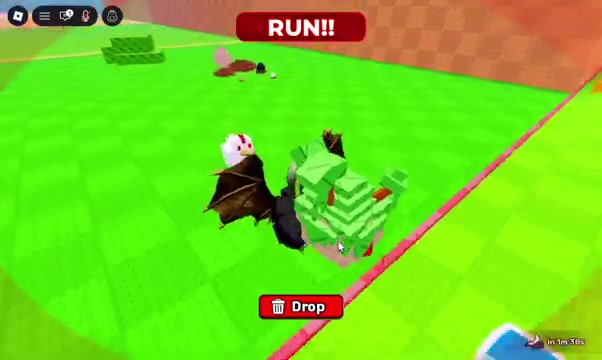
Carry the Egg back along the task route until you reach your Pen. - 03
HATCH STATE
Place the Egg and wait for the hatch state
Do: Use Place your Egg! or the equivalent prompt, then wait for the on-screen hatch state to finish.
Result: The Egg becomes a Pet and the task continues to Pet placement.
- 04
PET PLACEMENT
Place the Pet in the Pen
Do: Follow the current placement prompt and leave the resulting Pet inside the fenced Pen area.
Result: The Pet remains in the Pen and can show a name, an income label, or periodic +$ feedback.
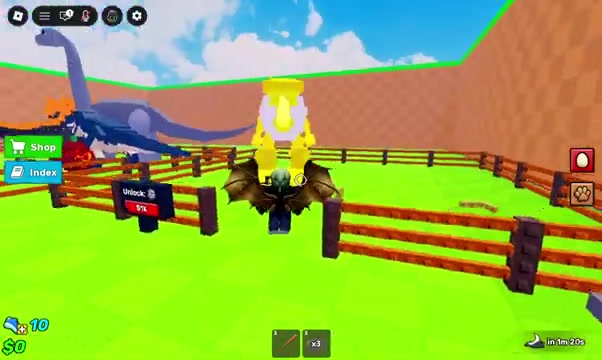
After the Egg hatches, finish placing the Pet inside your fenced Pen. - 05
SUCCESS CHECK
Confirm the basic money cycle
Do: Watch the Pet area and compare the periodic +$ feedback with the money display.
Result: Your money total increases as the placed Pet produces income.
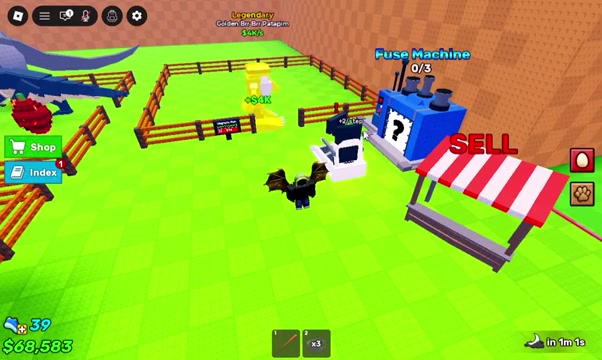
Pet income appears near the Pen, with the blue Fuse Machine in the same progression area. - 06
NEXT DECISION
Choose your next upgrade
Do: Once the first Pet is earning, repeat the Egg loop or use a visible upgrade or treadmill option that fits your current balance.
Result: You begin growing your Pet income or Speed instead of being stuck on the tutorial loop.
WATCH THE ROUTE
How to Play Steal an Egg Roblox Full Guide
Watch one onboarding run from stealing an Egg through Pet placement, income, and the nearby progression machines.
If the embedded player is not working, try opening the video on YouTube.
Watch on YouTube (opens in a new tab)ECONOMY · FIRST RELIABLE SOURCE
How the basic money path works
Your first reliable money source is a hatched Pet placed in your Pen. Start with that repeatable loop before experimenting with other machines.
Basic source
Pets placed in the Pen produce money.
How to confirm it
Watch the +$ feedback near the Pet and check that the money display increases.
What money can buy
Use your current menu to compare affordable base, Pen, and treadmill options. Prices can change, so follow the values in your server.
What about the SELL stall?
Check the current prompt and confirmation screen before using it. Do not assume what will be sold or how much it will pay.
Fastest money method
For a new account, repeat the Egg-to-Pet loop you can complete consistently. Open the Get Rich Guide when you are ready to compare your next progression choices.
LATER PROGRESSION · VERIFY IN GAME
Using the Fuse Machine
The blue Fuse Machine can appear near your Pen with a 0/3 counter. Treat it as a later progression feature until the current interface clearly shows which items it accepts and what you will receive.
Where to look
Check the progression area near your Pen, treadmill, and SELL stall.
What 0/3 means for you
The counter is empty. It does not by itself tell you which items qualify, so wait for the machine menu or prompt.
Choosing materials
Only select items that the current menu names as valid inputs. Avoid risking a valuable Pet just to test the machine.
Before confirming
Read any cost, item-consumption, and result preview shown by the current interface before you continue.
If the machine will not open
Continue the main Egg, Pet, money, and Speed tasks, then return after more progression. Use the on-screen prompt rather than a fixed desktop key.
QUICK ANSWERS
Beginner FAQ
Cannot join? Start here
Open official Roblox Status for platform incident notices, then try Steal An Egg on Roblox. Neither a normal platform status nor a public server list guarantees that your account can join. Use the checks below.
What should I do if I cannot join Steal An Egg?
Check the official Roblox Status link above for a platform incident, then try the official game page. If joining fails, record the exact error message, time, device and whether the problem affects only your account. Try another public server or restart the Roblox client. A single failed join does not establish a game-wide outage.
Does an active server list mean I can join?
No. A join problem can depend on your account, device, region or chosen server. Compare the exact error after retrying; this Wiki does not provide a live availability check.
What should I do first in Steal An Egg?
Follow the current task marker through one Egg carry, return to your Pen, hatch and place the Pet, then confirm that the Pet produces money.
Where does beginner money come from?
Place a hatched Pet in your Pen, then watch for periodic +$ feedback and an increase in your money display.
What is the fastest way to make money?
For a new account, repeat the Egg-to-Pet loop you can finish consistently. The best later method depends on your Pets, upgrades, prices, and current game version.
How do I use the Fuse Machine?
Go to the blue machine near your Pen and follow the prompt shown on your device. Only use items accepted by the current menu, and read the cost and result preview before confirming.
What can I sell at the SELL stall?
Use the current stall prompt and confirmation screen to see what your account can sell. Do not place a valuable item until the game clearly identifies the item and payout.